Users of Anthropic's Claude AI are encountering surprisingly swift usage limits, with some top-tier subscribers reporting caps in as little as 30-40 minutes . This rapid consumption stems from Claude’s unique token-based pricing, especially when managing its expansive context window and utilizing advanced agentic tools.
To avoid hitting these limits, users must adopt strategic habits like keeping chat sessions concise, carefully crafting initial prompts, leveraging Claude’s Projects feature for token caching, and judiciously selecting between the Haiku, Sonnet, and Opus models based on task complexity.
Why Are Claude Users Hitting Limits So Fast?
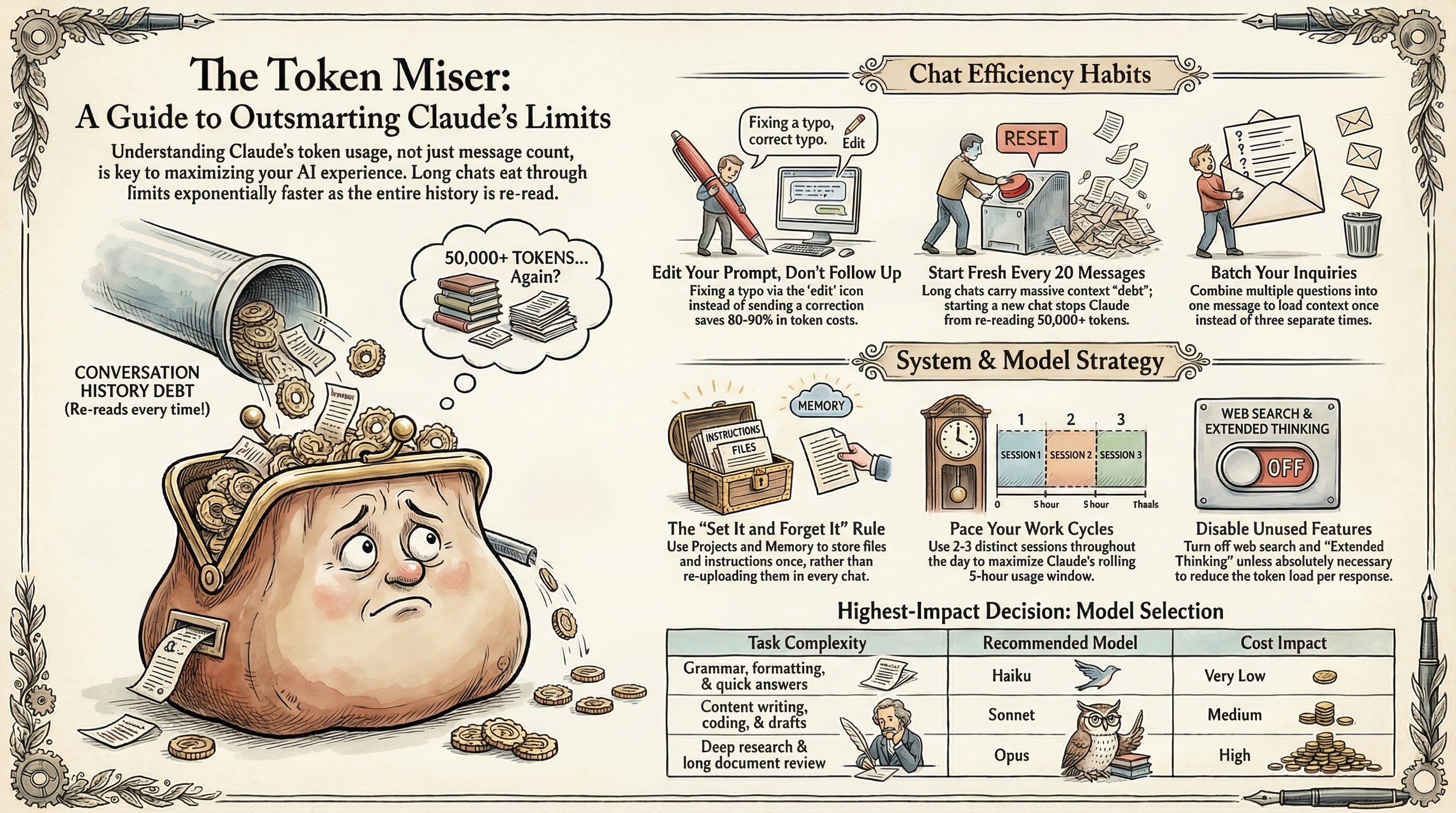
Unlike some competitors that employ a rolling context window, Claude aims to maintain a consistently large context window, capable of processing up to one-million tokens —enough for an entire novel or extensive codebase. While powerful, this design means that with every interaction in a chat, the entire conversation history is resubmitted to the model. This quickly inflates token usage, leading to frustratingly fast limit hits, particularly for those accustomed to longer chat threads on platforms like ChatGPT .The problem is compounded by Claude's agentic AI tools, such as Claude Cowork and Claude Code, which can burn through tokens at an accelerated pace. These tools often split complex tasks into multiple steps, each consuming additional tokens. This has led to significant user frustration, especially within the developer community using Claude Code.
Anthropic, the developer behind Claude, has acknowledged the issue. Lydia Hallie, a member of Anthropic’s Technical Staff, stated on X that Anthropic was “aware people are hitting usage limits in Claude Code way faster than expected,” confirming an active investigation into the problem. Users have reported dramatic increases in token consumption; one noted a single sentence reply jumped their usage from 59% to 100% . Furthermore, Anthropic recently implemented peak-hour throttling, meaning tokens deplete faster during periods of high demand.
Mastering Token Management in Claude
Navigating Claude’s usage caps requires a deliberate approach to interaction. The primary strategy involves recognizing that tokens equate directly to cost, making careful planning paramount. Users on the $100-200 a month Claude Max plan, which offers up to 20 times the usage limits of the $20-a-month Claude Pro plan, are still hitting walls, underscoring the need for efficient usage.The first adjustment for many is to break the habit of continuous, lengthy chat threads. Instead, start fresh conversations often. This prevents the model from re-processing extensive prior content with each new turn, significantly reducing token burn. For extended projects, request Claude to summarize the conversation, then start a new chat with that summary.
Careful prompt crafting also saves tokens. Instead of vague initial requests that lead to multiple back-and-forths, detail your requirements upfront. If you have clarifying questions for Claude, pose them in a single batch. This minimizes the iterative dialogue that quickly consumes your allotment.
One of Claude's most effective token-saving features is its Projects workspace. Attaching documents to a project only charges tokens the first time it’s submitted. After that, Claude considers the cached document in subsequent turns without additional token costs. This provides a powerful way to manage context for ongoing tasks, effectively creating a token-efficient knowledge base for your AI assistant.
Finally, choosing the right Claude model for the job is crucial. While Claude Opus is adept at complex problem-solving, it is also the most token-hungry. Reserve Opus for high-level planning or intricate tasks, much like an architect designing blueprints. For "grunt work" or intermediate steps, Sonnet offers a balanced approach, while Haiku , the fastest model, excels at simple tasks like proofreading or quick summaries.