
Open Sources
Curated repos, tools, and frameworks shaping the developer ecosystem.
Live data from GitHub.
Curated repos, tools, and frameworks shaping the developer ecosystem.
Live data from GitHub.
by confident-ai
The LLM Evaluation Framework


Documentation | Metrics and Features | Getting Started | Integrations | Confident AI




<a href="https://www.readme-i18n.com/confident-ai/deepeval?lang=de">Deutsch</a> |
<a href="https://www.readme-i18n.com/confident-ai/deepeval?lang=es">Español</a> |
<a href="https://www.readme-i18n.com/confident-ai/deepeval?lang=fr">français</a> |
<a href="https://www.readme-i18n.com/confident-ai/deepeval?lang=ja">日本語</a> |
<a href="https://www.readme-i18n.com/confident-ai/deepeval?lang=ko">한국어</a> |
<a href="https://www.readme-i18n.com/confident-ai/deepeval?lang=pt">Português</a> |
<a href="https://www.readme-i18n.com/confident-ai/deepeval?lang=ru">Русский</a> |
<a href="https://www.readme-i18n.com/confident-ai/deepeval?lang=zh">中文</a>
DeepEval is a simple-to-use, open-source LLM evaluation framework, for evaluating large-language model systems. It is similar to Pytest but specialized for unit testing LLM apps. DeepEval incorporates the latest research to run evals via metrics such as G-Eval, task completion, answer relevancy, hallucination, etc., which uses LLM-as-a-judge and other NLP models that run locally on your machine.
Whether you're building AI agents, RAG pipelines, or chatbots, implemented via LangChain or OpenAI, DeepEval has you covered. With it, you can easily determine the optimal models, prompts, and architecture to improve your AI quality, prevent prompt drifting, or even transition from OpenAI to Claude with confidence.
[!IMPORTANT] Need a place for your DeepEval testing data to live 🏡❤️? Sign up to Confident AI to compare iterations of your LLM app, generate & share testing reports, and more.
Want to talk LLM evaluation, need help picking metrics, or just to say hi? Come join our discord.
📐 Large variety of ready-to-use LLM eval metrics (all with explanations) powered by ANY LLM of your choice, statistical methods, or NLP models that run locally on your machine covering all use cases:
Custom, All-Purpose Metrics:
🎯 Supports both end-to-end and component-level LLM evaluation.
🧩 Build your own custom metrics that are automatically integrated with DeepEval's ecosystem.
🔮 Generate both single and multi-turn synthetic datasets for evaluation.
🔗 Integrates seamlessly with ANY CI/CD environment.
🧬 Optimize prompts automatically based on evaluation results.
🏆 Easily benchmark ANY LLM on popular LLM benchmarks in under 10 lines of code., including MMLU, HellaSwag, DROP, BIG-Bench Hard, TruthfulQA, HumanEval, GSM8K.
DeepEval plugs into any LLM framework — OpenAI Agents, LangChain, CrewAI, and more. To scale evals across your team — or let anyone run them without writing code — Confident AI gives you a native platform integration.
Confident AI is an all-in-one platform that integrates natively with DeepEval.
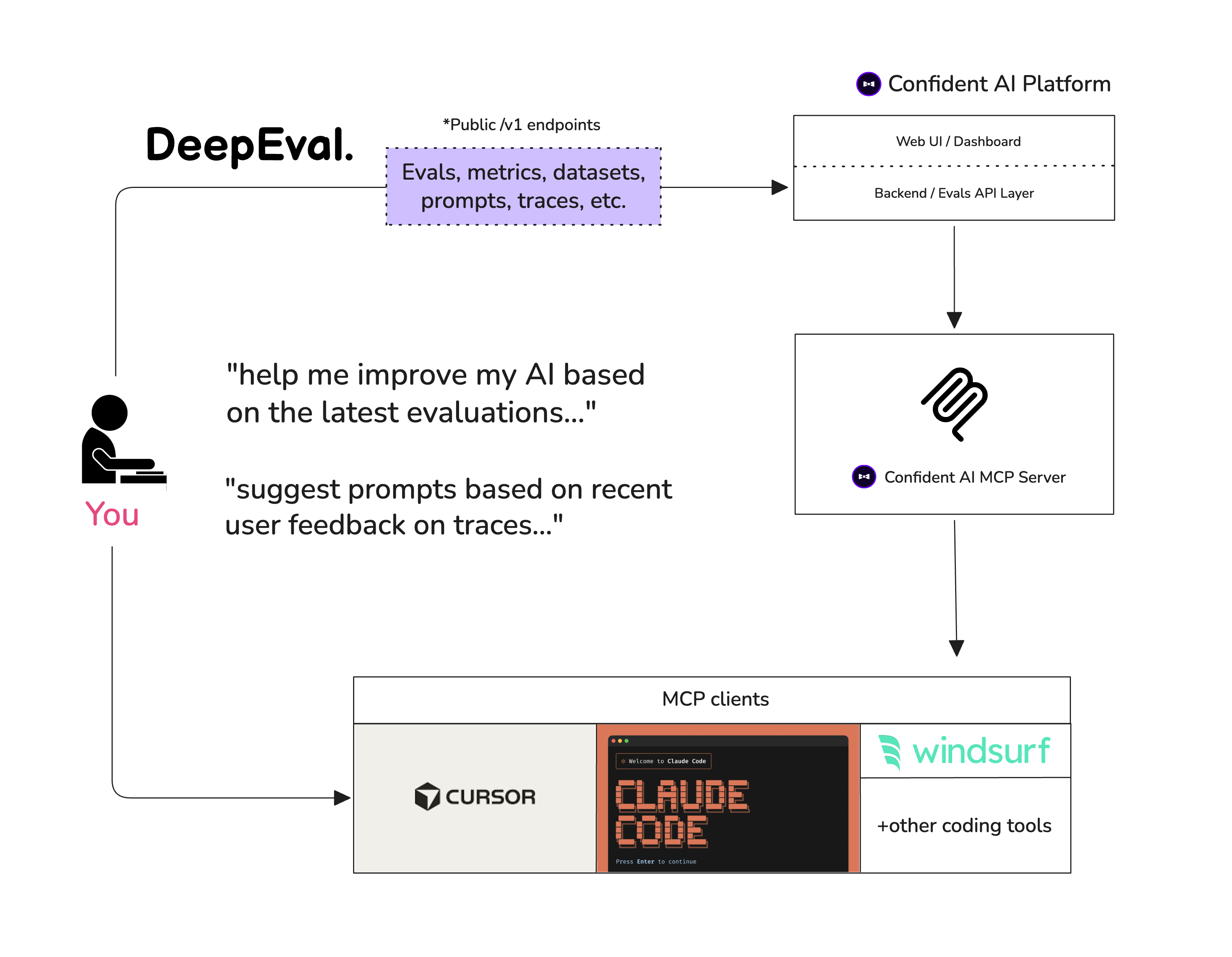
Want your coding agent to add evals and fix failures for you? Install the DeepEval skill, point it at your agent, RAG pipeline, or chatbot, and ask it to generate a dataset, write the eval suite, run deepeval test run, and iterate on the failing metrics.
Start with the 5-minute vibe-coder guide.
Let's pretend your LLM application is a RAG based customer support chatbot; here's how DeepEval can help test what you've built.
Deepeval works with Python>=3.9+.
pip install -U deepeval
Using the deepeval platform will allow you to generate sharable testing reports on the cloud. It is free, takes no additional code to setup, and we highly recommend giving it a try.
To login, run:
deepeval login
Follow the instructions in the CLI to create an account, copy your API key, and paste it into the CLI. All test cases will automatically be logged (find more information on data privacy here).
Create a test file:
touch test_chatbot.py
Open test_chatbot.py and write your first test case to run an end-to-end evaluation using DeepEval, which treats your LLM app as a black-box:
import pytest
from deepeval import assert_test
from deepeval.metrics import GEval
from deepeval.test_case import LLMTestCase, SingleTurnParams

def test_case():
    correctness_metric = GEval(
        name="Correctness",
        criteria="Determine if the 'actual output' is correct based on the 'expected output'.",
        evaluation_params=[SingleTurnParams.ACTUAL_OUTPUT, SingleTurnParams.EXPECTED_OUTPUT],
        threshold=0.5
    )
    test_case = LLMTestCase(
        input="What if these shoes don't fit?",
        # Replace this with the actual output from your LLM application
        actual_output="You have 30 days to get a full refund at no extra cost.",
        expected_output="We offer a 30-day full refund at no extra costs.",
        retrieval_context=["All customers are eligible for a 30 day full refund at no extra costs."]
    )
    assert_test(test_case, [correctness_metric])
Set your OPENAI_API_KEY as an environment variable (you can also evaluate using your own custom model, for more details visit this part of our docs):
export OPENAI_API_KEY="..."
And finally, run test_chatbot.py in the CLI:
deepeval test run test_chatbot.py
Congratulations! Your test case should have passed ✅ Let's break down what happened.
input mimics a user input, and actual_output is a placeholder for what your application's supposed to output based on this input.expected_output represents the ideal answer for a given input, and GEval is a research-backed metric provided by deepeval for you to evaluate your LLM outputs on any custom with human-like accuracy.criteria is correctness of the actual_output based on the provided expected_output.threshold=0.5 threshold ultimately determines if your test has passed or not.Read our documentation for more information!
Use evals_iterator() to run the same dataset through your app, whether you instrument it manually or through one of DeepEval's framework integrations.
Here's an example of manual instrumentation:
from deepeval.tracing import observe, update_current_span
from deepeval.test_case import LLMTestCase
from deepeval.metrics import TaskCompletionMetric

@observe()
def inner_component(input: str):
    output = "result"
    update_current_span(test_case=LLMTestCase(input=input, actual_output=output))
    return output

@observe()
def app(input: str):
    return inner_component(input)

# This metric will be run on your trace end to end.
for golden in dataset.evals_iterator(metrics=[TaskCompletionMetric()]):
    app(golden.input)
from deepeval.openai import OpenAI
from deepeval.tracing import trace
from deepeval.metrics import TaskCompletionMetric

client = OpenAI()

# This metric will be run on your trace end to end.
for golden in dataset.evals_iterator():
    with trace(metrics=[TaskCompletionMetric()]):
        client.chat.completions.create(
            model="gpt-4o",
            messages=[{"role": "user", "content": golden.input}],
        )
from agents import Runner
from deepeval.metrics import TaskCompletionMetric

# This metric will be run on your trace end to end.
for golden in dataset.evals_iterator(metrics=[TaskCompletionMetric()]):
    Runner.run_sync(agent, golden.input)
from deepeval.anthropic import Anthropic
from deepeval.tracing import trace
from deepeval.metrics import TaskCompletionMetric

client = Anthropic()

# This metric will be run on your trace end to end.
for golden in dataset.evals_iterator():
    with trace(metrics=[TaskCompletionMetric()]):
        client.messages.create(
            model="claude-sonnet-4-5",
            max_tokens=1024,
            messages=[{"role": "user", "content": golden.input}],
        )
from deepeval.integrations.langchain import CallbackHandler
from deepeval.metrics import TaskCompletionMetric

# This metric will be run on your trace end to end.
for golden in dataset.evals_iterator():
    llm.invoke(
        golden.input,
        config={"callbacks": [CallbackHandler(metrics=[TaskCompletionMetric()])]},
    )
from deepeval.integrations.langchain import CallbackHandler
from deepeval.metrics import TaskCompletionMetric

# This metric will be run on your trace end to end.
for golden in dataset.evals_iterator():
    agent.invoke(
        {"messages": [{"role": "user", "content": golden.input}]},
        config={"callbacks": [CallbackHandler(metrics=[TaskCompletionMetric()])]},
    )
from deepeval.metrics import TaskCompletionMetric

# This metric will be run on your trace end to end.
for golden in dataset.evals_iterator(metrics=[TaskCompletionMetric()]):
    agent.run_sync(golden.input)
from deepeval.integrations.crewai import instrument_crewai
from deepeval.metrics import TaskCompletionMetric

instrument_crewai()

# This metric will be run on your trace end to end.
for golden in dataset.evals_iterator(metrics=[TaskCompletionMetric()]):
    crew.kickoff({"input": golden.input})
from deepeval.integrations.agentcore import instrument_agentcore
from deepeval.metrics import TaskCompletionMetric

instrument_agentcore()

# This metric will be run on your trace end to end.
for golden in dataset.evals_iterator(metrics=[TaskCompletionMetric()]):
    invoke({"prompt": golden.input})
import asyncio
from deepeval.evaluate.configs import AsyncConfig
from deepeval.metrics import TaskCompletionMetric

# This metric will be run on your trace end to end.
for golden in dataset.evals_iterator(
    async_config=AsyncConfig(run_async=True),
    metrics=[TaskCompletionMetric()],
):
    task = asyncio.create_task(agent.run(golden.input))
    dataset.evaluate(task)
import asyncio
from deepeval.evaluate.configs import AsyncConfig
from deepeval.integrations.google_adk import instrument_google_adk
from deepeval.metrics import TaskCompletionMetric

instrument_google_adk()

# This metric will be run on your trace end to end.
for golden in dataset.evals_iterator(
    async_config=AsyncConfig(run_async=True),
    metrics=[TaskCompletionMetric()],
):
    task = asyncio.create_task(run_agent(golden.input))
    dataset.evaluate(task)
from deepeval.integrations.strands import instrument_strands
from deepeval.metrics import TaskCompletionMetric

instrument_strands()

# This metric will be run on your trace end to end.
for golden in dataset.evals_iterator(metrics=[TaskCompletionMetric()]):
    agent(golden.input)
Learn more about component-level evaluations here.
Alternatively, you can evaluate without Pytest, which is more suited for a notebook environment.
from deepeval import evaluate
from deepeval.metrics import AnswerRelevancyMetric
from deepeval.test_case import LLMTestCase

answer_relevancy_metric = AnswerRelevancyMetric(threshold=0.7)
test_case = LLMTestCase(
    input="What if these shoes don't fit?",
    # Replace this with the actual output from your LLM application
    actual_output="We offer a 30-day full refund at no extra costs.",
    retrieval_context=["All customers are eligible for a 30 day full refund at no extra costs."]
)
evaluate([test_case], [answer_relevancy_metric])
DeepEval is extremely modular, making it easy for anyone to use any of our metrics. Continuing from the previous example:
from deepeval.metrics import AnswerRelevancyMetric
from deepeval.test_case import LLMTestCase

answer_relevancy_metric = AnswerRelevancyMetric(threshold=0.7)
test_case = LLMTestCase(
    input="What if these shoes don't fit?",
    # Replace this with the actual output from your LLM application
    actual_output="We offer a 30-day full refund at no extra costs.",
    retrieval_context=["All customers are eligible for a 30 day full refund at no extra costs."]
)

answer_relevancy_metric.measure(test_case)
print(answer_relevancy_metric.score)
# All metrics also offer an explanation
print(answer_relevancy_metric.reason)
Note that some metrics are for RAG pipelines, while others are for fine-tuning. Make sure to use our docs to pick the right one for your use case.
DeepEval auto-loads .env.local then .env from the current working directory at import time.
Precedence: process env -> .env.local -> .env.
Opt out with DEEPEVAL_DISABLE_DOTENV=1.
cp .env.example .env.local
# then edit .env.local (ignored by git)
Confident AI is an all-in-one platform to manage datasets, trace LLM applications, and run evaluations in production. Log in from the CLI to get started:
deepeval login
Then run your tests as usual — results are automatically synced to the platform:
deepeval test run test_chatbot.py
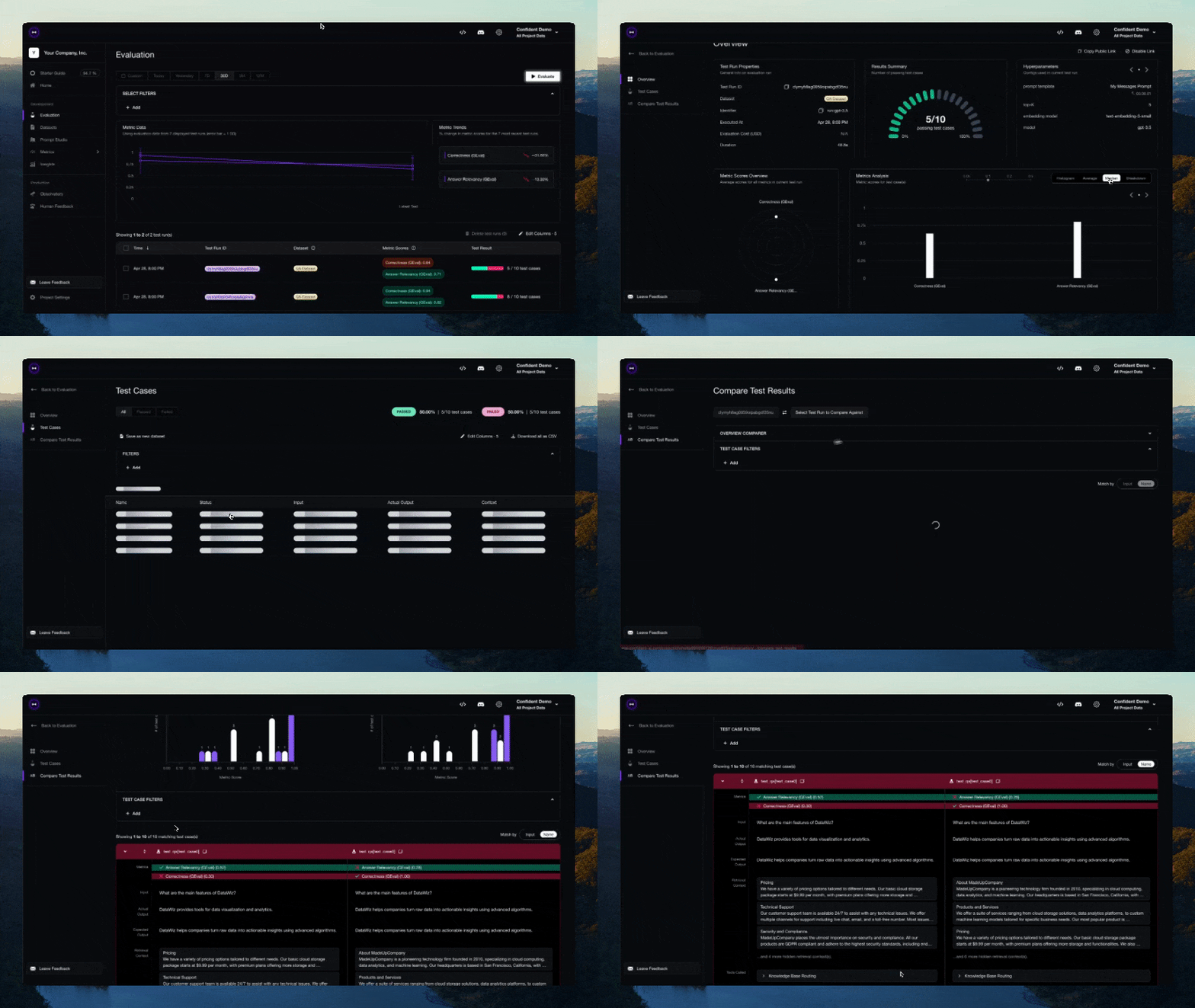
Prefer to stay in your IDE? Use DeepEval via Confident AI's MCP server as the persistent layer to run evals, pull datasets, and inspect traces without leaving your editor.
Everything on Confident AI is available here.
Please read CONTRIBUTING.md for details on our code of conduct, and the process for submitting pull requests to us.
Features:
Built by the founders of Confident AI. Contact jeffreyip@confident-ai.com for all enquiries.
DeepEval is licensed under Apache 2.0 - see the LICENSE.md file for details.
Public repository for Agent Skills