Most voice synthesis tools work the same way. You type text, upload a voice sample, and an API somewhere in the cloud generates audio. It works. But your voice data leaves your machine, your costs scale with every character, and you have limited control over what happens to the models trained on your input.
VoiceBox takes a different approach. It runs entirely on your hardware. No API calls, no per-character billing, no data leaving your machine.
Built by Jamie Pine, VoiceBox is a local-first AI voice studio that handles both sides of the voice loop: text-to-speech output and speech-to-text input. It has accumulated over 24,500 stars on GitHub and is currently on version 0.5.0, released April 2026. The project is open source under the MIT license.
What VoiceBox Does
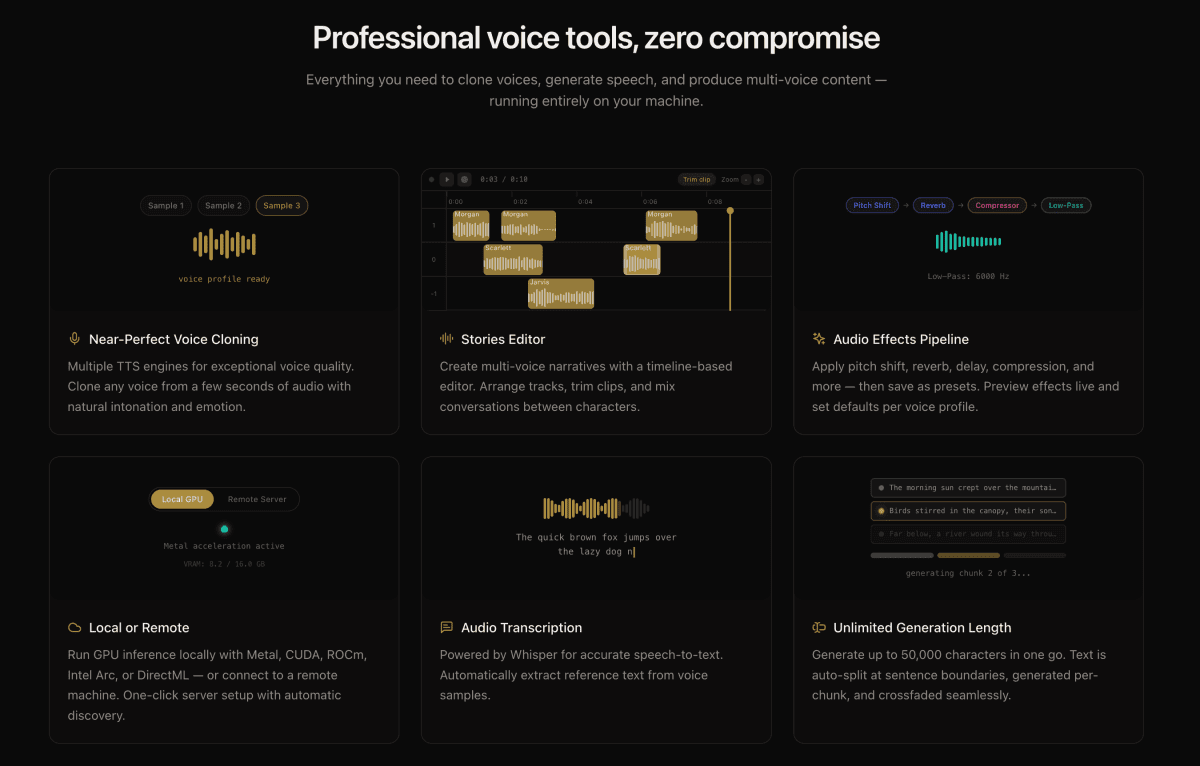
At its core, VoiceBox is a desktop application built with Tauri (Rust) and FastAPI (Python). It ships with seven TTS engines, each with different strengths:- Qwen3-TTS and Qwen CustomVoice for natural-language delivery control
- LuxTTS for lightweight generation (~1GB VRAM, 150x real-time on CPU)
- Chatterbox Multilingual and Chatterbox Turbo for expressive speech with paralinguistic tags like
[laugh],[sigh], and[gasp] - HumeAI TADA for emotional speech synthesis
- Kokoro for 50+ curated preset voices
Beyond basic TTS, VoiceBox includes post-processing effects powered by Spotify's pedalboard library: pitch shift, reverb, delay, chorus, compression, and filters. There are four built-in presets (Robotic, Radio, Echo Chamber, Deep Voice) and you can create custom ones.
The Privacy Argument
With cloud-based voice cloning services, your voice data is uploaded to external servers. Depending on the provider's terms of service, that data may be used to train or improve their models. Once uploaded, you lose visibility into how it is processed or stored.VoiceBox sidesteps this entirely. Models download once and run locally. Voice profiles, generated audio, and capture recordings stay in your data directory. Nothing phones home.
For creators building content at scale, or anyone cloning a voice they care about protecting, this distinction matters.
How to Install VoiceBox
macOS (Apple Silicon)
- Download the DMG from voicebox.sh/download/mac-arm
- Drag VoiceBox to your Applications folder
- On first launch, grant the required Accessibility and Input Monitoring permissions when prompted
macOS (Intel)
- Download the DMG from voicebox.sh/download/mac-intel
- Same installation and permissions process
Windows
- Download the MSI installer from voicebox.sh/download/windows
- Run the installer and follow the prompts
Docker
For headless or server deployments:docker compose upBuilding From Source
If you want to run the latest development version:git clone https://github.com/jamiepine/voicebox.git
cd voicebox
just setup # creates Python venv, installs all deps
just dev # starts backend + desktop appPrerequisites: Bun, Rust, Python 3.11+, Tauri prerequisites, and Xcode on macOS. Install just via brew install just or cargo install just.
How to Clone Your First Voice
- Open VoiceBox and navigate to the Profiles section
- Click Create Profile
- Either upload an audio file of the voice you want to clone, or record directly in the app
- Give the profile a name and optional description
- Select a TTS engine (Qwen3-TTS is a good starting point for general use; LuxTTS if you want fast, lightweight generation)
- Type your text in the generation box and click Generate
- Preview the output, apply effects if needed, and export
Working With the REST API
VoiceBox exposes a REST API athttp://127.0.0.1:17493 for integrating voice generation into your own applications, scripts, and pipelines.Generate Speech
curl -X POST http://127.0.0.1:17493/generate \
  -H "Content-Type: application/json" \
  -d '{ "text": "Hello world", "profile_id": "abc123", "language": "en" }'
Agent Voice Output
Any application or script can trigger voice output through a cloned profile:curl -X POST http://127.0.0.1:17493/speak \
-H "Content-Type: application/json" \
-H "X-Voicebox-Client-Id: my-script" \
-d '{ "text": "Deploy complete.", "profile": "Morgan" }'Transcribe Audio
curl -X POST http://127.0.0.1:17493/transcribe \
  -F "audio=@recording.wav" \
  -F "model=whisper-turbo"
List Voice Profiles
curl http://127.0.0.1:17493/profilesFull API documentation is available at http://127.0.0.1:17493/docs when the app is running.
MCP Server for AI Agents
VoiceBox ships with a built-in Model Context Protocol (MCP) server. Any MCP-aware agent like Claude Code, Cursor, or Windsurf can speak, transcribe, and browse voice profiles directly.Claude Code Setup (one line)
claude mcp add voicebox \
  --transport http \
  --url http://127.0.0.1:17493/mcp \
  --header "X-Voicebox-Client-Id: claude-code"
Cursor / Windsurf / VS Code
Add to your MCP config:{
"mcpServers": {
"voicebox": {
"url": "http://127.0.0.1:17493/mcp",
"headers": {
"X-Voicebox-Client-Id": "cursor"
}
}
}
}Four MCP tools are available: voicebox.speak, voicebox.transcribe, voicebox.list_captures, and voicebox.list_profiles. You can bind specific voice profiles to specific agents in Settings, so Claude Code uses one voice and Cursor uses another.
The Stories Editor
For longer-form audio like podcasts, conversations, or narrative content, VoiceBox includes a multi-track timeline editor. You can compose multi-voice projects with drag-and-drop, trim and split audio inline, pin specific generation versions per track clip, and export the composed timeline.This is useful for anyone producing audio content that involves more than one voice or requires precise timing control.
How VoiceBox Compares to Cloud Alternatives
| Feature | VoiceBox | ElevenLabs | WisprFlow |
|---|---|---|---|
| Voice cloning | Local, on-device | Cloud API | N/A |
| Speech-to-text | Local Whisper | Cloud API | Cloud API |
| Cost model | Free (your hardware) | Per-character billing | Subscription |
| Data privacy | All data stays local | Data uploaded to cloud | Data uploaded to cloud |
| TTS engines | 7 engines, switchable | Proprietary models | N/A |
| MCP integration | Built-in | No | No |
| Open source | MIT license | Proprietary | Proprietary |
| Platform support | macOS, Windows, Linux, Docker | Web, API | macOS |
VoiceBox is not a direct replacement for every use case. Cloud services offer higher-fidelity voices out of the box and require zero hardware configuration. But for workflows where data ownership, cost control, and API flexibility matter, VoiceBox fills a gap that cloud providers do not address.
Who This Is For
- Content creators producing narrated articles, podcasts, or video voiceovers at scale without per-character costs
- Developers integrating voice I/O into applications via REST API or MCP
- AI agent builders who want their agents to speak in cloned voices
- Privacy-conscious teams that cannot send voice data to third-party servers
- Accessibility projects building voice synthesis tools for people who can't speak in their original voice
Source: github.com/jamiepine/voicebox
Website: voicebox.sh
Docs: docs.voicebox.sh